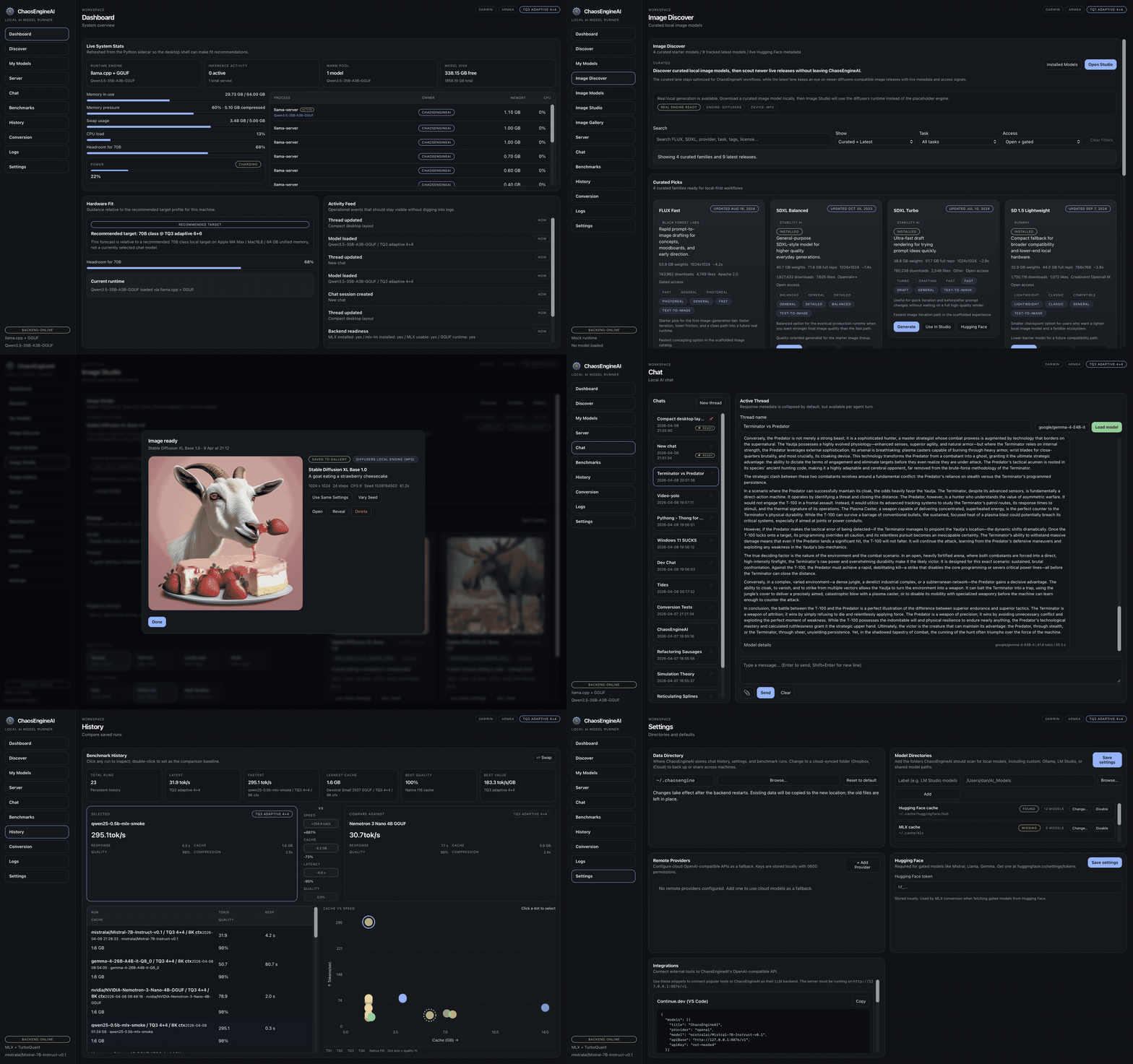
Your local AI workstation.

Chat, images, video, benchmarks, and an OpenAI-compatible API — local, in one desktop app.

Speculative decoding MTPLX + DFlash + DDTree

Native MTP on Apple Silicon, draft-model DFlash, tree-aware DDTree. Backend picks the fastest path per model.

Cache control 7 + 2 strategies

Native, TurboQuant, TriAttention, FBCache, TeaCache, TaylorSeer, PAB. Two more — MagCache, FasterCache — reachable via CLI / API for power users.

Evaluation 3 benchmark modes

Throughput, perplexity, and task accuracy. Saved, diffable, comparable.

local runtime online
ChaosEngineAI product walkthrough
macOS Linux Windows signed in-app updates
Why it feels different

Not a launcher. A control plane.

Catalog, runtime tuning, tool calling, image and video pipelines, server, benchmarks, prompt library, and plugins — one workspace, one mental model.

Runtime decisions in one place

Native f16, compressed KV cache, speculative decoding. Pick from the UI, not a shell flag.

Proof, not vibes

Run a benchmark, save it, diff it. Know whether a cache strategy or draft model is actually worth it.

Outputs that stay together

Threads, images, videos, templates, logs, adapters, and API snippets all live in one desktop surface.

Product tour

The way a power user actually moves through it.

Discovery, chat, benchmarks, image and video studios, and OpenAI-compatible serving — one runtime-aware desktop.

Model catalogs + launch controls

Find the right model, not just a file.

Curated families, capability filters, direct Hugging Face inspection, and launch-ready variants help you move from browsing to running without context switching.
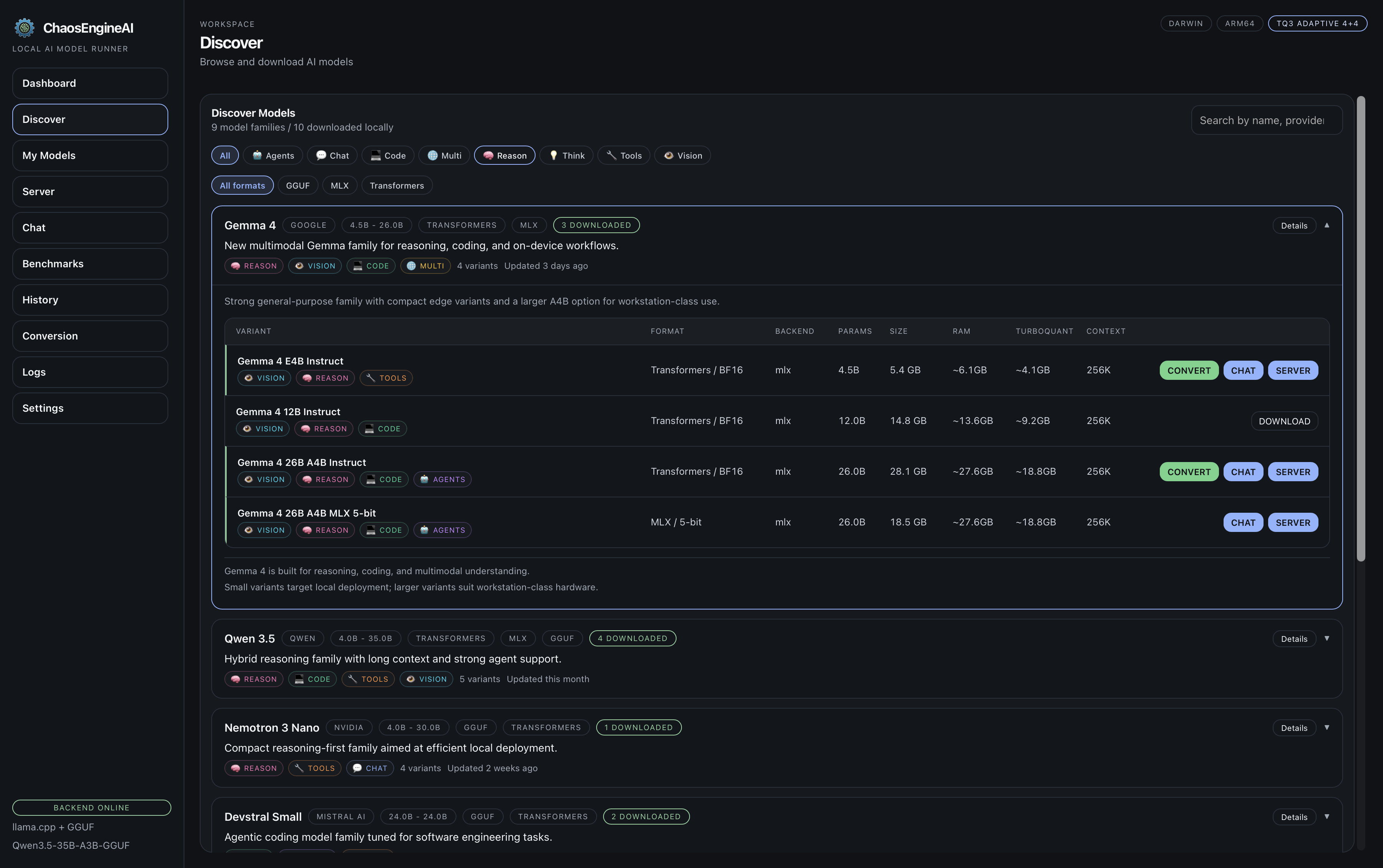
    ChaosEngineAI Discover tab
    Runtime Lab

    The knobs that actually matter.

    Speculative decoding for speed, cache compression for memory. Real telemetry, not hand-waving.

    Speculative decoding

    MTPLX, DFlash, DDTree

    Native MTP heads on Apple Silicon, draft-model DFlash, tree-aware DDTree. Backend auto-picks based on the model.

    Estimated speedup 1.0x
    Acceptance Baseline
    Runtime note Native generation

    Standard decoding keeps the simplest possible path. Turn on DFlash or DDTree when you want faster generation with native f16 cache.

    KV cache compression

    Estimate the memory win

    Each strategy is a first-class runtime choice — not a buried config flag.

    Estimated cache 9.0 GB
    Compression 1.0x
    Best fit All runtimes

    Native f16 keeps maximum fidelity. Compression backends appear in the app automatically once installed into the local runtime.

    Feature spread

    Broader than a launcher. Tighter than a notebook.

    Local inference, agent tooling, image and video workflows, evaluation, and developer integrations — one surface.

    Chat and prompting

    Threads that remember their runtime.

    • Multi-thread chat with pinned sessions and per-thread model + runtime memory.
    • Document uploads with chunked retrieval and inline citations.
    • Vision attachments, reasoning mode, and collapsible thinking traces.
    • Tool calling: web search, calculator, file reader, code executor.
    • Prompt Library with searchable templates, tags, and one-click apply.
    Models and runtimes

    Discovery to serving without leaving the app.

    • Curated text, image, and video catalogs plus Hugging Face browsing.
    • Multiple model directories — custom stores, shared folders, ad-hoc paths.
    • Apple Silicon conversion from Hugging Face checkpoints to MLX with live progress.
    • Warm-pool runtime reuse for instant reactivation of recent profiles.
    • OpenAI-compatible local server with LAN mode, auto-start, and live request stats.
    Image Studio

    A full local image pipeline.

    • Image Discover for curated diffusion models and compatibility-aware installs.
    • Prompt-driven generation with aspect ratios, seeds, negatives, and quality presets.
    • Gallery with reruns, seed variation, and one-click reveal on disk.
    • Preload and unload controls so diffusion behaves like the text runtime.
    • Saved metadata so you can reproduce what actually worked.
    Video Studio

    Local text-to-video, same workspace.

    • Native MLX text-to-video on Apple Silicon for LTX-2 and Wan2.1 / Wan2.2.
    • One-click Wan install: downloads checkpoints and converts to MLX in the background.
    • Cross-platform fallback via diffusers and stable-diffusion.cpp on CUDA (HunyuanVideo, CogVideoX, Mochi).
    • Cache strategies — FBCache, TeaCache, TaylorSeer, MagCache, PAB, FasterCache — apply to video DiTs too.
    • Live per-step thumbnail previews so you can kill bad seeds early.
    Performance and proof

    Measure the tradeoff. Don't guess.

    • Throughput, perplexity, and task-accuracy benchmarks in the same UI.
    • Persistent history with chart and table views, delta tables, scatter plots.
    • DFlash and DDTree speculative decoding with draft-model auto-resolution.
    • Runtime controls for cache bits, FP16 layers, context, fused attention.
    • Live telemetry, backend health, logs, and orphaned-worker cleanup.
    Extensibility

    Built for people who wire tools together.

    • Plugin system for cache strategies, engines, tools, sources, and post-processors.
    • LoRA adapter discovery plus fine-tuning hooks for local workflows.
    • Remote provider configs for OpenAI-compatible APIs, stored locally with masked keys.
    • Integration snippets for Continue.dev, Goose, Cursor, and Claude Code via the local API.
    • Signed desktop releases with in-app updates across macOS, Linux, and Windows.
    Drop-in local backend

    Point your other tools at it.

    The built-in OpenAI-compatible server turns the app into a local backend for editors, agents, and CLIs.

    Continue.dev
    {
      "provider": "openai",
      "model": "current-model",
      "apiBase": "http://127.0.0.1:8876/v1"
    }
    Cursor
    Override OpenAI Base URL
    http://127.0.0.1:8876/v1
    
    Add your local model id.
    Goose
    GOOSE_PROVIDER=openai
    GOOSE_MODEL=current-model
    OPENAI_BASE_URL=http://127.0.0.1:8876/v1
    Claude Code proxy
    export ANTHROPIC_BASE_URL=http://127.0.0.1:8876/v1
    export ANTHROPIC_AUTH_TOKEN=not-needed
    Headless automation

    chaosengine-cli drives the whole backend.

    A typed CLI that reaches every backend route. Script chat, image, video, benchmarks, setup, and diagnostics.

    Full-surface coverage

    95 shortcuts plus a generic dispatcher.

    • 95 typed shortcuts: load, prompt, bench, image, video, server, setup.
    • Generic call <METHOD> <PATH> reaches the remaining routes — 100% of the 125 endpoints.
    • Python stdlib only. No extra dependencies.
    • JSON to stdout — composes cleanly with jq and CI jobs.
    • Streaming and non-streaming modes with optional inline metrics.
    Quick start
    chaosengine-cli load mlx-community/Qwen3.6-35B-A3B-4bit --spec
    chaosengine-cli prompt "Write a Rust quicksort" --stream --metrics
    chaosengine-cli video "Aurora over a glacier, drone shot" --model Wan-AI/Wan2.1-T2V-1.3B
    Download and build

    Install fast. Or build from source.

    Signed release builds for macOS, Linux, and Windows. Source stack: Tauri, React, TypeScript, Rust, Python.